
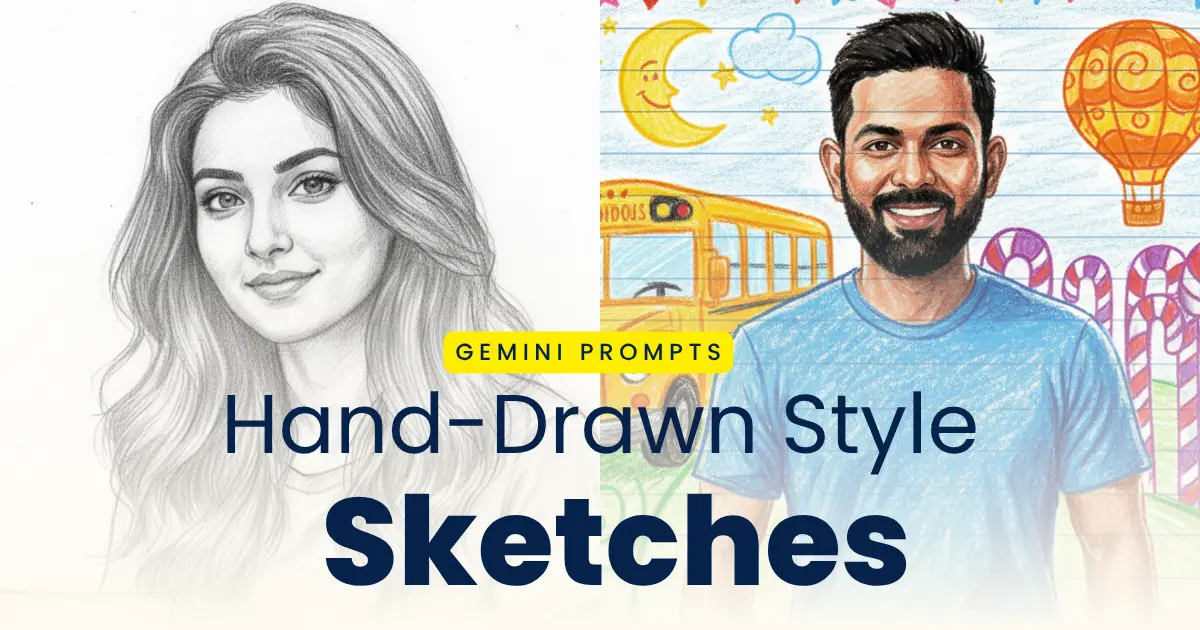
Hand-drawn style sketches and paintings have been trending on the internet these days as it looks so natural, clean and sophisticated to see. Users are drawn by the realistic looking hand-drawn style sketches and you don’t need to be a good artist make one for yourself. Infact, you can create multiple hand-drawn style sketches without even a pencil, all you need is your image and a good prompt. Google Gemini AI image generation helps you create creative images with just a simple prompt.
You can create pencil sketches, artistic illustrations, custom portrait drawings, and various other types of hand-drawn style sketches or illustration with the help of Gemini’s AI image generation using the prompts provided in this post. In this post, we provide the best AI prompts for creating hand-drawn style sketches to turn your normal photos into realistic pencil skethces and various other hand-drawn style sketches, charcoal drawings, ink sketches, and aesthetic line-art portraits, along with a step-by-step guide and clear instructions for the same.
Why Use Gemini AI for Hand-Drawn Sketches
Hand-Drawn sketches with gaining populal and viral on the internet, users also wants to create their version of sketch. We would discuss why we should Gemini AI for generating the hand-drawn style sketches:
- It helps in generating images in detailed, realistic sketch effects with better accuracy
- We can create a wide range of sketch styles like pencil, ink, charcoal, and line art
- Image generation is fast and effective for artists, content creators, and designers
- You can customize your prompts for fine-tuning of shading, texture, strokes, and artistic depth
- You can generate any form of images such as portraits, landscapes, products, and creative concepts
Best Gemini AI Prompts for Hand-Drawn Style Sketches
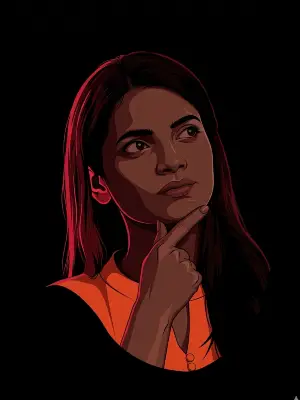
Neo Noir Vector Illustration Prompt: Create a 3:4 vertical ultra-clean vector portrait strictly based on the provided reference image, ensuring the subject’s facial identity is preserved with 100% accuracy—do not modify facial structure, proportions, skin tone, bone structure, eye spacing, nose shape, lip shape, jawline, hairline, beard density, or any defining facial characteristics; apply style transformation only with absolutely no identity alteration. Convert the portrait into a high-contrast neo-noir vector illustration featuring a tight head-and-upper-neck crop, while preserving the exact face angle and orientation from the reference, with strong cinematic framing, large negative space, and the subject centered or slightly off-center. Use a pure solid black background (#000000) with no gradients, textures, or noise, and apply dramatic single-direction rim lighting with dominant red/crimson edge lighting from one side, creating deep pitch-black shadows and sharp high-contrast separation, resulting in a clean, minimal, cinematic neo-noir vector aesthetic in high resolution.

Or

A high-contrast vector illustration of a young man with curly hair and sunglasses perched on his forehead. The art style uses a grayscale palette for the face and clothing, featuring sharp cell shading and deep black shadows. Intense neon red rim lighting outlines his silhouette and hair against a solid black background. Minimalist, modern, and edgy graphic design style
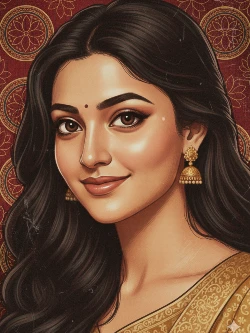
Folk Art Aesthetics Style Prompt: A vertically framed artistic wallpaper inspired by classical Indian miniature and folk art aesthetics. A close-up portrait of a handsome Indian man with his face gently tilted sideways, viewed from above, creating an intimate and serene composition. He has expressive dark eyes with a calm yet intense gaze, bold natural eyebrows, a strong jawline, and a small traditional red tilak on his forehead. His dark hair is softly textured and slightly tousled, adding organic flow. The background is a rich deep maroon and crimson red textile-inspired surface, filled with intricate hand-drawn circular mandala and lotus motifs, resembling ancient Indian murals and temple art. The background texture appears aged, distressed, and parchment-like, with subtle scratches, grain, and worn paint details. The skin is rendered in a painterly, illustrated style with visible brush strokes and fine linework, not photorealistic. Color palette dominated by deep reds, maroons, gold undertones, warm browns, and muted beige highlights. Soft ambient lighting with gentle shadows, no harsh contrast. Art Style: Hand-illustrated, digital painting, Indian classical art fusion, folk art texture, vintage mural aesthetic. Ultra-high resolution, vertical wallpaper format (9:16), cinematic composition, no text, no watermark, clean edges, suitable for mobile wallpaper.
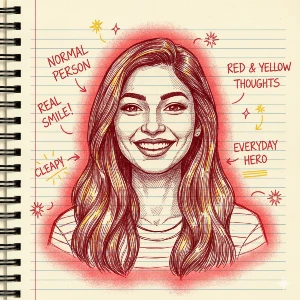
Doodle Art Hand-Drawn Illustration Prompt: Generate a hand-drawn portrait illustration in red and yellow pen on notebook paper, inspired by doodle art and comic annotations. Keep full likeness of the subject, expressive lines, spontaneous gestures, bold outline glow, handwritten notes around, realistic pen stroke texture, 4K resolution.
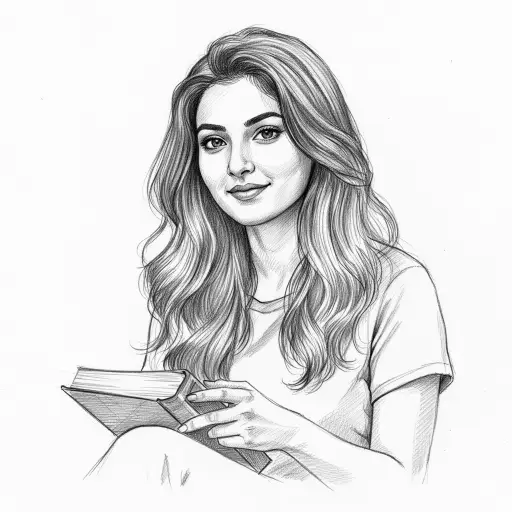
Pencil Sketch Portrait Prompt: Hand-drawn graphite pencil sketch portrait of the uploaded image. Traditional art medium, highly detailed, professional-grade illustration. Use soft shading and blending with smooth gradients, utilizing a full range of graphite tones from deep 6B shadows to light H pencil highlights. Realistic hair texture, individual strands visible, and dynamic flow. Emphasize delicate, precise line work. Realistic texture of graphite dust and subtle pencil strokes on slightly textured sketch paper. Soft, directional studio lighting. Clean white background.

Charcoal Drawing Prompt: Hand-drawn charcoal drawing portrait of the uploaded image. Traditional art medium, expressive, professional-grade illustration. Use rich, deep, and velvety charcoal shading with smooth transitions achieved through blending, from intense, dark compressed charcoal blacks to soft, powdery light gray tones. Emphasize expressive, bold, and dynamic charcoal strokes. Realistic texture of charcoal dust and smudge marks on slightly textured, off-white drawing paper. High fidelity on eyes, lips, and nose. Textured, voluminous hair. Dramatic, high-contrast lighting creating deep shadows and stark highlights. Simple, muted background that gently fades into the paper.
Ink Pen Illustration Prompt: Hand-drawn ink pen illustration portrait of the uploaded subject. Traditional art medium, crisp, graphic, professional-grade illustration. Shading achieved entirely through precise hatching, cross-hatching, and line density, with no soft blending. Use clean, crisp, and consistent ink lines of varying thickness. The illustration should evoke the texture of ink on smooth, clean illustration paper. High fidelity on eyes, lips, and nose with meticulous linework. Structured and defined hair with flowing ink lines and hatched shading. Clear, well-defined lighting creating distinct shadows. Clean white background.
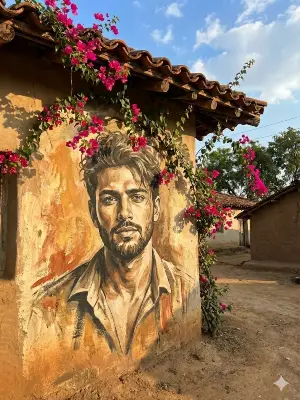
Oil Paint Photo Prompt: Turn the uploaded photo into a large, hand-painted mural on a rustic village wall with Brush paining effect. Preserve the exact face and expression. Add vibrant pink bougainvillea flowers cascading from the roof, wrapping naturally around the mural. Use warm sunlight, soft shadows, and earthy tones of mud houses in the background. Maintain high realism with a slight artistic mural texture on the wall. Blend the portrait seamlessly into the surface as if painted on it. Create a natural village street environment with clay tiles, sky, and greenery. Bright, colorful, authentic rural aesthetic, image ratio 3:4.
Oil Paint Photo Prompt: Create a high-resolution oil painting version of this photo. Include layered brush strokes, canvas texture, deep shadows, rich warm tones, and a gallery-style artistic finish.

Hand-Drawn Cartoon Style Prompt: Hand-drawn cartoon style illustration portrait of the uploaded subject. Traditional art feel, expressive, simplified, and professional-grade. Use bold, clean, and confident outlines with consistent line weight. Shading achieved through cel-shading or flat color with clear, defined shadow shapes. Vibrant, appealing color palette. Simplified and stylized shapes, with expressive, engaging eyes and mouth. Hair rendered in simplified, stylized shapes conveying volume. Clear, engaging pose and facial expression. Simple, complementary background.
Steps to Create Hand-Drawn Sketches with Gemini AI
Step 1: Open Google Gemini App or website on your browser and log into your account.
Step 2: Upload your reference image for creating the hand-drawn sketch.
Step 3: Copy any prompt from the styles provided above and paste it.
Step 4: Customize your prompt by adding details like shading, line style, or mood for better accuracy.
Step 5: Click on the send button to generate the desired image, and make changes if required.
Step 6: Download the image that has been generated.
Create your New Year Photos with Hand Draw Prompts
Tips for Perfect Hand-Drawn AI Sketches
Every one is generating the hand-drawn style sketches and illustrations, but the point here is how to make yours better and unique to make it stand out amongst all and make it viral and trending on the social media platforms.
- Upload high quality images for references to get better result and keep the face similar.
- Include descriptive terms like “shading,” “cross-hatching,” “graphite texture,” or “smooth lines” in your prompts.
- Keep your background plain and simple for portrait sketches to make it look clean.
- Try out different drawing styles and experiment for creative variation of your sketches.
- Add artistic keywords like “vintage,” “realistic,” or “minimalist” or something that you want to make it look artistic.
Conclusion
Image Generation in 2025 has been easy and quick with Google Gemini AI image generation. tool, however, you would also need a good image editing prompt to get the best result. Whether you are a beginner or advanced photo editor, you can create high quality creative photo edits using your reference image and a detailed editing prompt. You can create pencil art, charcoal shading, line drawings, and ink sketches in seconds if you have the right prompt for generating such images, and you need not worry about that as we have provided the prompts for different hand-drawn style sketches in this post that you may might helpful.
Best Gemini AI Prompts for Creating Hand-Drawn Style Sketches
Pencil Sketch Portrait Prompt: Hand-drawn graphite pencil sketch portrait of the uploaded image. Traditional art medium, highly detailed, professional-grade illustration. Use soft shading and blending with smooth gradients, utilizing a full range of graphite tones from deep 6B shadows to light H pencil highlights. Realistic hair texture, individual strands visible, and dynamic flow. Emphasize delicate, precise line work. Realistic texture of graphite dust and subtle pencil strokes on slightly textured sketch paper. Soft, directional studio lighting. Clean white background.
Hand-drawn style sketches and paintings have been trending on the internet these days as it looks so natural, clean and sophisticated to see. Users are drawn by the realistic looking hand-drawn style sketches and you don’t need to be a good artist make one for yourself. Infact, you can create multiple hand-drawn style sketches without even a pencil, all you need is your image and a good prompt. Google Gemini AI image generation helps you create creative images with just a simple prompt.
Doodle Art Hand-Drawn Illustration Prompt: Generate a hand-drawn portrait illustration in red and yellow pen on notebook paper, inspired by doodle art and comic annotations. Keep full likeness of the subject, expressive lines, spontaneous gestures, bold outline glow, handwritten notes around, realistic pen stroke texture, 4K resolution.
Generate a hand-drawn portrait illustration in red and yellow pen on notebook paper, inspired by doodle art and comic annotations. Keep full likeness of the subject, expressive lines, spontaneous gestures, bold outline glow, handwritten notes around, realistic pen stroke texture, 4K resolution.
Doodle Art Hand-Drawn Illustration Prompt: Generate a hand-drawn portrait illustration in red and yellow pen on notebook paper, inspired by doodle art and comic annotations. Keep full likeness of the subject, expressive lines, spontaneous gestures, bold outline glow, handwritten notes around, realistic pen stroke texture, 4K resolution.
Nice
Very nice art i love it
KDoodle Art Hand-Drawn Illustration Prompt: Generate a hand-drawn portrait illustration in red and yellow pen on notebook paper, inspired by doodle art and comic annotations. Keep full likeness of the subject, expressive lines, spontaneous gestures, bold outline glow, handwritten notes around, realistic pen stroke texture, 4K resolution.
Kural
Kural amuthan