
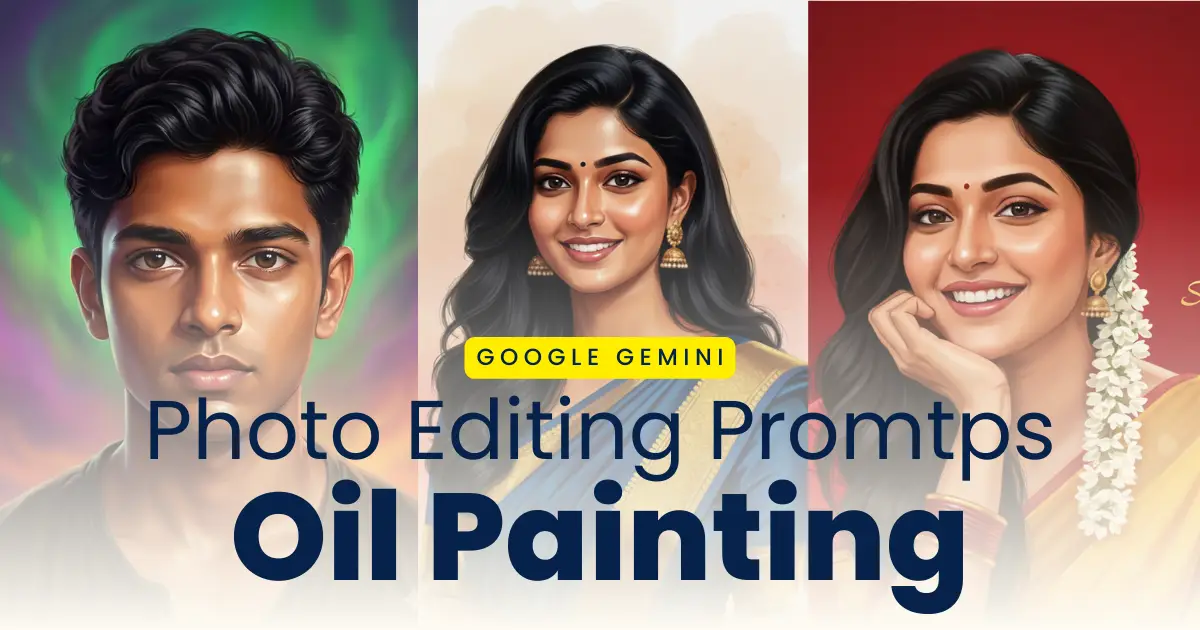
Oil Paintings digital art photos has been very popular among the individuals these days. The trend to create oil paint digital portraits from an ordinary image has been growing on various social media platforms. These photos looks very attractive and attracts the users towards it because of the richness and realistic look of the images. The best thing about this is that you can easily create your oil paiting portraits with the help of a reference image and a simple prompt in Google Gemini. The photo editing tool of Google Gemini uses the advanced AI to analyse your photo and tranform it into high quality photos in oil painting or water colour painting style. These portraits are excellent way of attracting and engaging with the audience which is why artists, creators and social media users are creating theirs and sharing it with their viewers.
Create trending photos and hand drawn sketches with Gemini prompts in Google Gemini.
You can create your realistic oil paint photos in a single click without any advanced editing skills and expensive editing tools. Whether you are a beginner or advanced photo editor you can easily create the attractive visuals with these promtps. In this post, we provide the best Google Gemini prompts for creating hand-drawn style sketches to transform your normal photos into realistic oil paitings portraits and water colour painting, along with a step-by-step guide and clear instructions for the same.
Why Use Google Gemini for Oil Painting Style Photos
Google Gemini helps users to create oil painting style photos effortlessley in just a few clicks. The image generation feature of Gemini analyzes the lighting, texture, depth and facial feature of the reference image to generate hand-painted oil painting style using a simple prompt with your creativity. The image generated is realistic with original brush strokes, canvas texture, and classic art aesthetics. You should use Google Gemini for oil painting style photos because:
- The oil painting effects of Gemini are realistic and high quality
- You do not need any advanced editing skills to edit your photos
- The image generation is fast and easy in just a few clicks
- It can be used for portraits, landscapes or any type of art
- You can use these images for social media posts and digital projects
Create trending Holi celebration photos with Gemini prompts in Google Gemini in seconds.
Google Gemini Prompts to Create Oil Paintings from Normal Photo
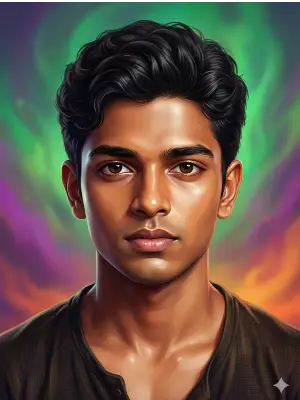
Oil Paiting Photo Editing Prompt for Boy: Generate a highly detailed digital portrait based on the uploaded photo. Preserve full likeness and facial structure while enhancing features with smooth warm-toned skin, symmetrical detailing, and soft glow highlights on the forehead and cheeks. Apply a realistic yet polished illustration style with glossy skin texture, sharp expressive eyes, and natural hair detail. Add cinematic soft lighting for depth. Create a vibrant dreamy background with softly swirling gradient colors in green, purple and orange tones, slightly blurred to keep focus on the subject. Use studio portrait composition, centered framing, high resolution, refined brush strokes, realistic hair texture, and 8K ultra-quality artistic digital painting finish.
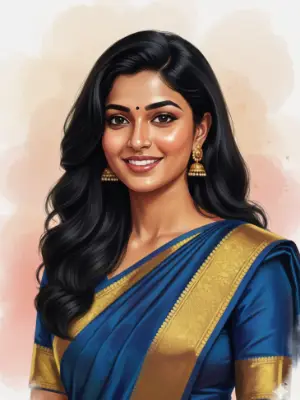
Digital Oil Paiting Girl Photo Editing Prompt: Realistic digital oil painting of a beautiful young woman with long, wavy black hair, smiling gracefully. She is wearing an royal blue saree with a golden border and matching golden jhumka earrings. A small black bindi adorns her forehead. Her skin has a soft, warm glow with natural tones. The background is a smooth watercolor-style blend of pastel peach, beige, and light pink shades, creating a gentle and artistic feel. The lighting is soft and balanced, highlighting her cheerful, expression and serene beauty. The overall composition should feel elegant, traditional, and refined,100% same face.
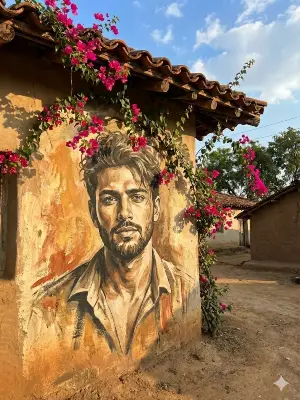
Wall Paiting Style Prompt: A vertically framed artistic wallpaper inspired by classical Indian miniature and folk art aesthetics. A close-up portrait of a handsome Indian man with his face gently tilted sideways, viewed from above, creating an intimate and serene composition. He has expressive dark eyes with a calm yet intense gaze, bold natural eyebrows, a strong jawline, and a small traditional red tilak on his forehead. His dark hair is softly textured and slightly tousled, adding organic flow. The background is a rich deep maroon and crimson red textile-inspired surface, filled with intricate hand-drawn circular mandala and lotus motifs, resembling ancient Indian murals and temple art. The background texture appears aged, distressed, and parchment-like, with subtle scratches, grain, and worn paint details. The skin is rendered in a painterly, illustrated style with visible brush strokes and fine linework, not photorealistic. Color palette dominated by deep reds, maroons, gold undertones, warm browns, and muted beige highlights. Soft ambient lighting with gentle shadows, no harsh contrast. Art Style: Hand-illustrated, digital painting, Indian classical art fusion, folk art texture, vintage mural aesthetic. Ultra-high resolution, vertical wallpaper format (9:16), cinematic composition, no text, no watermark, clean edges, suitable for mobile wallpaper.
How to Transform Photos into Oil Paintings Using Google Gemini
The steps to transform your normal photos into oil paintings using google gemini is simple and easy. You can create your digital paint art in just a few cliks with these steps:
Step 1: Open Google Gemini website on your browser or Google Gemini app.
Step 2: Upload your clear photo which you want to convert into an oil painting.
Step 3: Copy the prompt provided above and paste it in the text box.
Step 4: Make changes to the prompt as per your creativity and style.
Step 5: Click on the send button to generate the image.
Step 6: Review the image and make changes if required.
Step 7: Tap on the download button to save the oil painting image to your device.
Best Tips for Better Oil Painting Results
You can create your image using the Nano Banana of Google Gemini. The oil paiting image generated by Gemini can be made better with these tips. These tips would help you create high quality realistic images:
- Upload clear image in which you face is clearly visible for reference
- Clearly mention the style of image you want to generate such as digital paiting or modern oil painting
- Mention the quality and size of the image for best results
- Create multiple images in different style to get the perfect oil paint portrait
- Make changes to your prompt and customize accordingly
Conclusion
The process of transforming normal photos into oil paintings is no longer complex and difficult. Google Gemini AI makes it simple to generate the oil painting image of your choice in any style you want using just a simple prompt provided above. You can get your oil paint art for social media posts for better engagement and also use it for professional arts with the right prompt. Either you are a beginner or professional photo editor you can get your digital art in just a few clicks without using any professional photo editing tools or apps.
Photo
Driving licence