

As the year 2025 is coming to an end and the New Year 2026 is knocking at the door, people are creating distinct and eye catching images using Google Gemini AI. New Year celebration and wishes posters and images would be a great art to mark the New year 2026’s celebration. You can easily create different types of new year posters and post it to your Instagram posts, stories, Whats App status which as visually very appealing.
Using the right prompt you can create professional high quality unique images such as portrait photos, posters, greetings, using various scenes and aesthetic background. You don’t need advanced editing skills or tools to create your new year images as with Google Gemini and the right prompt you can easily create your aesthetic and new year images.
In this post, we provide the best new year 2026 photo editing prompts to create stunning and eye catching photos and posters by making your new year images stand out among all and go viral, along with a step-by-step guide and clear instructions for the same.
Why Create New Year Photos with Gemini AI
Google Gemini’s image generation feature has been attracting the users with its advanced and realistic image creation. With the help of Google Gemini, you can easily create beautiful new year posters and photos within seconds. The image created by Google Gemini are realistic, aesthetic and cinematic without the use of any advanced and premium editing skills and tools. In addition to this, you may use Gemini AI for creating your new year images for the following reasons:
- You can create high-quality, visually appealing new year images.
- You can create different variations of images based on trending social media posts and posters.
- You can create images in different styles such as neon effect, cinematic images, and 3D images.
- You can create images for personal posts as well as marketings posters for new year.
- You don’t need to be a professionl editor to create your images as gemini helps you create customizable images in seconds.
Best Gemini AI Prompts for New Year Photos
Here the best Gemini AI photo editing prompts for creating trending and viral new year photos for girls, boys and couples.
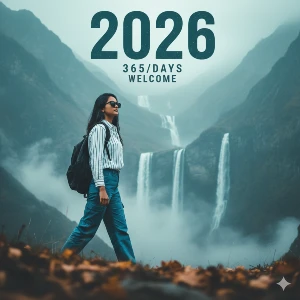
Girl New Year Photo Prompt: A cinematic portrait of a girl wearing sunglasses, a white-and-blue baton shirt, blue cargo pants, and carrying a black backpack in her left hand. She walks confidently across a soft, blurred foreground, captured from a left-side angle. Behind her is a dreamy, misty landscape in teal, blue, and light-gray hues. Large stylized text above reads “2026” in a distressed teal font, with “365/DAYS” below and “The Santo” at the top. Smooth skin, natural realism, ultra-detailed lighting, non-cartoon style, New Year theme, 8K resolution.
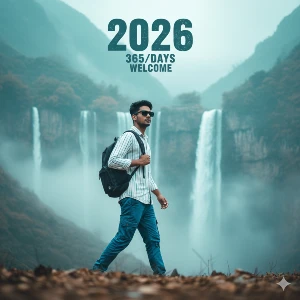
Boy New Year Photo Prompt: A cinematic portrait of a stylish man standing confidently, one hand in his pocket and the other holding the strap of his backpack. He wears a varsity jacket, white T-shirt, tapered black joggers, and clean white sneakers, looking slightly upward as if embracing new possibilities. Above him, large stylized text reads “2026” in a distressed teal font, with smaller text below: “365/365” and “A NEW BEGINNING”. Smooth skin, natural textures, dreamy lighting, highly detailed cinematic style, ultra-realistic 8K quality.
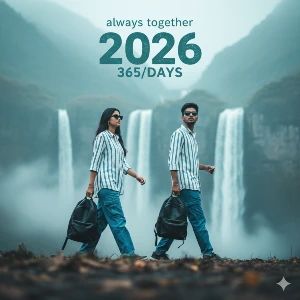
Couple New Year Photo Prompt: A highly-realistic cinematic shot of a girl and boy walking confidently toward the camera from a left-side angle. Both have the same faces as the uploaded reference image. They wear white–blue baton shirts, blue cargo pants, sunglasses, and the boy holds a black backpack in his left hand. Soft blurred foreground, with a dreamy hazy sky in muted teal, blue, and light-gray tones. Above them, bold distressed teal text reads “2026”, with “365/DAYS” below and “Always Together” at the top. Smooth skin, natural texture, detailed lighting, realistic New Year atmosphere, 8K ultra-quality.
Steps to Create New Year Photos with Gemini AI
Follow the steps mentioned below to create your trendig new year 2026 images with Google Gemini’s AI:
Step 1: Open Google Gemini app on your mobile or website and log into your account.
Step 2: Upload your photo for reference for creating your photo.
Step 3: Copy the prompt provided above as per your requirement and paste the prompt on the message box.
Step 4: You can modify the prompt as per the image you want by adding style, color and lightning for better result.
Step 5: Click on the Send button to generate your image.
Step 6: Download the image generated by clicking on the downward arrow icon.
Tips for Perfect New Year AI Images
As the New Year photos are trending on various social media platforms, many users would be creating the same image, so it would be the best if you could make some changes to your new year photos to make it attractive. Follow these tips to get the best results”
- Always upload the reference image in high quality get better accuracy in your images.
- Add lighting terms to make your photos visually appealing such as “neon glow,” “golden hour,” or “cinematic contrast.”
- Always mention the background details decorative lights, nature, mountain and so on.
- Make sure you mention the details in the prompt for best results.
- Generate images in different editing styles such as hand drawn, cinematic, aesthetic, 3D and so on.
Conclusion
You can easily create your high quality professional new year 2026 images with Google Gemini AI and the best editing prompts as provided in this post. You can create customizable photos in Google Gemini within seconds using the reference image and the right prompts. New year celebration posts can be uploaded on various social media platforms by attracting various other users too. AI generated photos have been trending all over the interent these days and you can create yours one with Google Gemini and photo prompts.
AlLAHUDEEN
Create a cinematic outdoor portrait of two people standing side-by-side using the exact facial